



min-height
The min-height property is used to set a minimum height of a specified element.
It is sometimes useful to constrain the height of an element in CSS to a certain range. Two properties are available to set a minimum and maximum height for an element: the min-height property and the max-height property.
The min-height property overrides both the height and max-height properties and prevents the value of the height property from becoming smaller than a specified value.
Official Syntax
-
Syntax:
min-height: <length> | <percentage> | inherit
- Initial: 0
- Applies To: all elements but non-replaced inline elements, table columns, and column groups
- Animatable: yes, as a length, percentage, or calc()
Notes
In CSS3, new values have been introduced to the min-height property. The official syntax looks like this:
min-height: [ [<length> | <percentage>] && [border-box | content-box]? ] | available | min-content | max-content | fit-contentValues
- <length>
- Specifies a fixed minimum computed height. See the <length> entry for a list of possible values.
- <percentage>
-
The <percentage> is calculated with respect to the height of the containing block. If the height of the containing block is not specified explicitly (i.e., it depends on content height), and this element is not absolutely positioned, the percentage value is treated as
0.See the <percentage> entry for a list of possible values.
- inherit
- The element inherits its minimum height value from its parent.
- available
- Height is equal to the containing block height minus the current element’s margin, border, and padding.
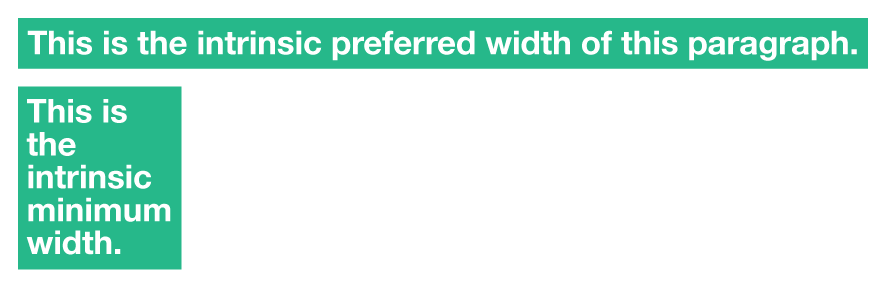
- max-content
-
The intrinsic preferred height. The
max-contentheight is, roughly, the height the content would have if no “soft” line breaks were inserted, i.e., if each paragraph is one long line. - min-content
-
The intrinsic minimum height. The
min-contentheight is, roughly, the tallest the box can get by breaking all lines at all possible break points. - fit-content
-
Same as
min-content. - contain-floats
-
This value will be the standards way of clearing floats. It is equivalent to
min-contentexcept that when applied to the extent of a block element it forces it to be large enough to contain the margin boxes of any floats that originate inside the block and that participate in the same block formatting context as the block’s immediate contents.See the
floatproperty entry for more information about floats, what clearing floats is, and why it is important.
The following experimental keyword values have been introduced in CSS3.
The following image helps understand the min-content and max-content values.
In CSS3, a new value is defined but is still not implemented in any browser. That value is the contain-floats value.
Notes
Negative values are not allowed.
The keyword values (in contrast to length and percentage values) are not influenced by the box-sizing property, they always set the size of the content box.
Available, max-content, min-content and fit-content are equivalent to 0 when set on the min-height of horizontal elements (when the writing mode is horizontal, i.e. the writing-mode property has a value of horizontal-tb).
Examples
min-height: 250px;
min-height: 50%;
min-height: 100vh;
min-height: inherit;
Live Demo
View this demo on the Codrops PlaygroundBrowser Support
The min-height property works in all major browsers: Chrome, Firefox, Safari, Opera, Internet Explorer, and on Android and iOS.
The new experimental values added in CSS3 are not yet supported in all browsers, and some of them have different equivalents supported in some browsers. The browser support for the new values is shown in the following table:
Intrinsic & Extrinsic Sizing
Allows for the heights and widths to be specified in intrinsic values using the `max-content`, `min-content`, `fit-content` and `stretch` (formerly `fill`) properties.
W3C Working Draft
Supported from the following versions:
Desktop
- 46
- No
- No
- 33
- 11
Mobile / Tablet
- No
- 66
- No
- 66
- No
Notes
The min-height property works in Safari on positioned elements.
CSS 2.1 explicitly leaves the behavior of min-height with <table> undefined, so it is still not supported by all browsers.